引言
链上数据的获取一直是DApp开发的痛点。想象一下:你要做一个DeFi Dashboard,需要展示某用户在Uniswap的所有交易历史。直接调用以太坊节点?每次查询可能需要几十秒,还可能因为数据量大而超时。把这逻辑搬到链下?又需要自己维护数据管道,处理区块同步和事件解析。
The Graph给出了一个优雅的解决方案:去中心化的索引网络,让开发者可以定义”数据应该怎么组织”,然后由网络自动追踪链上变化、索引数据、供查询使用。这篇文章会带你从零开始掌握The Graph的核心概念,并通过实际案例学会构建Subgraph。
一、The Graph核心概念解析
1.1 为什么需要The Graph
先看一个具体场景:Uniswap在以太坊上部署了工厂合约,每当有人创建新的交易对,合约会发出PairCreated事件。
如果用传统方式获取所有交易对:
javascript
// 直接调用以太坊节点(低效且复杂)
const Web3 = require("web3");
const web3 = new Web3("https://eth-mainnet.g.alchemy.com/...");

// 获取创世块到当前块的所有PairCreated事件
const events = await factory.getPastEvents("PairCreated", {
    fromBlock: 0,
    toBlock: "latest"
});

// 每一次DApp加载都要重复这个过程
问题很明显:查询时间长、数据量大、浪费资源。
使用The Graph后:
graphql
# 简单查询,毫秒级响应
{
  pairs(first: 5, orderBy: createdAtTimestamp, orderDirection: desc) {
    id
    token0 { symbol }
    token1 { symbol }
    createdAtTimestamp
  }
}
网络中的索引节点会持续追踪合约事件,解析数据并存储,开发者只需要编写GraphQL查询。
1.2 核心组件
Subgraph(子图)
Subgraph是The Graph的核心概念。它定义了三个部分:
- Manifest(清单):声明要索引哪些合约和事件
- Schema(模式):定义数据的结构和关系
- Mappings(映射):指定事件如何转换为数据
plaintext
my-subgraph/
├── subgraph.yaml          # Manifest定义
├── schema.graphql         # 数据模式
├── src/
│   ├── mapping.ts         # 映射逻辑
│   └── ...其他文件
└── build/                 # 编译输出
Graph Node(图形节点)
Graph Node是索引服务,负责监控区块链、处理事件、存储索引数据。它会:
- 监听区块链新区块
- 识别属于Subgraph的事件
- 执行映射函数
- 更新GraphQL数据库
Graph Network(图形网络)
去中心化的索引网络。开发者可以付费使用索引服务(通过GRT代币),索引者可以赚取查询费用和索引奖励。
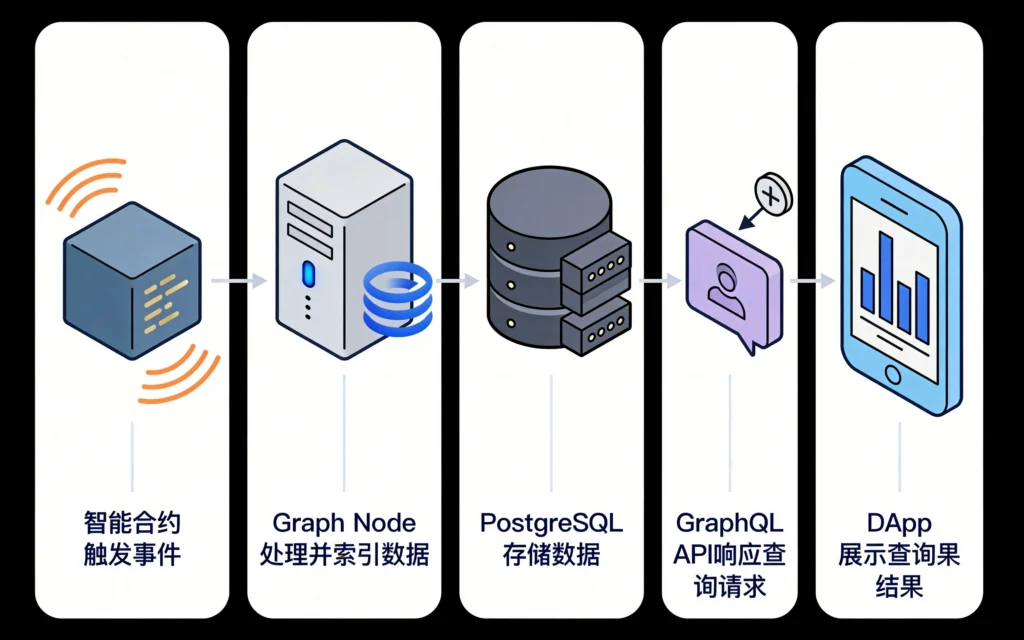
1.3 工作流程
plaintext
┌─────────────┐    事件    ┌──────────────┐
│   智能合约  │ ────────→ │  Graph Node  │
└─────────────┘           └──────────────┘
                                   │
                                   ▼
                            ┌──────────────┐
                            │  PostgreSQL  │
                            └──────────────┘
                                   │
                                   ▼
                            ┌──────────────┐
                            │  GraphQL API │
                            └──────────────┘
                                   │
                                   ▼
                            ┌──────────────┐
                            │    DApp      │
                            └──────────────┘
二、Subgraph开发实战
接下来通过一个实际案例来学习Subgraph开发。假设我们要为Uniswap V3的流动性事件构建索引。
2.1 项目初始化
使用Graph CLI创建Subgraph项目:
bash
# 全局安装Graph CLI
npm install -g @graphprotocol/graph-cli

# 初始化新项目
graph init

# 交互式配置
# Network: Ethereum
# Subgraph name: your-name/uniswap-v3-liquidities
# Directory: uniswap-v3-liquidities
# Contract name: UniswapV3
# Contract address: 0x1F98431c8aD98523631AE4a59f267346ea31F984 (Uniswap V3 Core)
# Contract ABI: Auto-fetch
# Index contract events: Yes
# Add other contract: Yes (NonfungiblePositionManager)
2.2 Schema设计
Schema定义了你要索引的数据结构。使用GraphQL类型系统。
graphql
# schema.graphql

# 代币实体
type Token @entity {
  id: ID!                    # 地址作为ID
  symbol: String!
  name: String!
  decimals: BigInt!
  totalSupply: BigInt!

  # 关系:代币参与的所有池子
  pools: [Pool!]! @derivedFrom(field: "token0")
  pools1: [Pool!]! @derivedFrom(field: "token1")
}

# 流动性池实体
type Pool @entity {
  id: ID!                    # 池子地址
  token0: Token!
  token1: Token!
  fee: BigInt!               # 费率 (3000 = 0.3%)

  # 流动性相关字段
  liquidity: BigInt!
  sqrtPrice: BigInt!
  tick: BigInt!

  # 时间戳
  createdAtTimestamp: BigInt!
  createdAtBlockNumber: BigInt!

  # 关系:池子的流动性位置
  positions: [Position!]! @derivedFrom(field: "pool")
}

# 流动性头寸实体
type Position @entity {
  id: ID!                    # tokenId或组合键

  # 所有者
  owner: Bytes!

  # 所属池子
  pool: Pool!

  # 流动性参数
  tickLower: BigInt!
  tickUpper: BigInt!
  liquidity: BigInt!

  # 交易数据
  depositedToken0: BigDecimal!
  depositedToken1: BigDecimal!
  withdrawnToken0: BigDecimal!
  withdrawnToken1: BigDecimal!

  # 时间戳
  transaction: Transaction!
  createdAtTimestamp: BigInt!
  createdAtBlockNumber: BigInt!
}

# 交易记录(用于关联多个事件)
type Transaction @entity {
  id: ID!                    # 交易哈希
  blockNumber: BigInt!
  timestamp: BigInt!

  # 关联事件
  mints: [Mint!]!
  burns: [Burn!]!
  collects: [Collect!]!
}
字段类型说明:
ID!:主键,必须唯一String!:非空字符串BigInt!:大整数,用于代币金额(Solidity的uint256映射)BigDecimal!:高精度小数,用于费率计算Bytes!:字节数组,用于地址@entity:表示这是持久化实体@derivedFrom:反向关系,自动生成查询字段
2.3 Manifest配置
subgraph.yaml声明要索引的合约:
yaml
# subgraph.yaml
specVersion: 1.0.0
indexerHints:
  prune: auto

repository: https://github.com/your-name/uniswap-v3-liquidities
schema:
  file: ./schema.graphql

dataSources:
  # Uniswap V3 Core (Factory)
  - kind: ethereum
    name: UniswapV3Factory
    network: mainnet
    source:
      address: "0x1F98431c8aD98523631AE4a59f267346ea31F984"
      abi: Factory
      startBlock: 12369621  # Uniswap V3部署区块
    mapping:
      kind: ethereum/events
      apiVersion: 0.0.7
      language: wasm/assemblyscript
      entities:
        - Pool
        - Token
      abis:
        - name: Factory
          file: ./abis/Factory.json
        - name: Pool
          file: ./abis/Pool.json
      eventHandlers:
        - event: PoolCreated(indexed address, indexable address, indexable address, uint256, indexable bytes32)
          handler: handlePoolCreated
      file: ./src/factory.ts

  # NonfungiblePositionManager
  - kind: ethereum
    name: NonfungiblePositionManager
    network: mainnet
    source:
      address: "0xC36442b4a4522E871399CD717aBDD847Ab11FE88"
      abi: NonfungiblePositionManager
      startBlock: 12369621
    mapping:
      kind: ethereum/events
      apiHandle: 0.0.7
      language: wasm/assemblyscript
      entities:
        - Position
        - Transaction
        - Mint
        - Burn
        - Collect
      abis:
        - name: NonfungiblePositionManager
          file: ./abis/NonfungiblePositionManager.json
        - name: Pool
          file: ./abis/Pool.json
      eventHandlers:
        - event: IncreaseLiquidity(indexed uint256, uint128, uint256, uint256)
          handler: handleIncreaseLiquidity
        - event: DecreaseLiquidity(indexed uint256, uint128, uint256, uint256)
          handler: handleDecreaseLiquidity
        - event: Collect(indexed uint256, address, uint256, uint256)
          handler: handleCollect
        - event: Transfer(indexed address, indexed address, indexed uint256)
          handler: handleTransfer
      file: ./src/positions.ts
2.4 映射逻辑实现
映射文件处理事件,将链上数据转换为实体。
工厂合约映射(处理池子创建):
typescript
// src/factory.ts
import { PoolCreated } from "../generated/UniswapV3Factory/Factory";
import { Pool, Token } from "../generated/schema";
import { Pool as PoolContract } from "../generated/templates";

export function handlePoolCreated(event: PoolCreated): void {
  // 1. 创建Token实体(如果不存在)
  let token0 = Token.load(event.params.token0.toHexString());
  if (!token0) {
    token0 = new Token(event.params.token0.toHexString());
    token0.symbol = "";
    token0.name = "";
    token0.decimals = BigInt.fromI32(18);
    token0.totalSupply = BigInt.zero();
    token0.save();
  }

  let token1 = Token.load(event.params.token1.toHexString());
  if (!token1) {
    token1 = new Token(event.params.token1.toHexString());
    token1.symbol = "";
    token1.name = "";
    token1.decimals = BigInt.fromI32(18);
    token1.totalSupply = BigInt.zero();
    token1.save();
  }

  // 2. 创建Pool实体
  let pool = new Pool(event.params.pool.toHexString());
  pool.token0 = token0.id;
  pool.token1 = token1.id;
  pool.fee = event.params.fee;
  pool.liquidity = BigInt.zero();
  pool.sqrtPrice = BigInt.zero();
  pool.tick = BigInt.zero();
  pool.createdAtTimestamp = event.block.timestamp;
  pool.createdAtBlockNumber = event.block.number;
  pool.save();

  // 3. 动态模板:为新池子创建索引任务
  PoolContract.create(event.params.pool);
}
位置管理器映射(处理流动性操作):
typescript
// src/positions.ts
import {
  IncreaseLiquidity,
  DecreaseLiquidity,
  Collect,
  Transfer,
} from "../generated/NonfungiblePositionManager/NonfungiblePositionManager";
import {
  Position,
  Token,
  Transaction,
  Mint,
  Burn,
  Collect as CollectEntity,
} from "../generated/schema";
import { constants } from "@graphprotocol/graph-ts";

// 全局代币精度映射
let BIGINT_ZERO = constants.BIGINT_ZERO;
let MantissaFormula = BigInt.fromI32(10).pow(18);

export function handleIncreaseLiquidity(event: IncreaseLiquidity): void {
  // 加载或创建Position
  let positionId = event.params.tokenId.toString();
  let position = Position.load(positionId);

  if (!position) {
    // 首次增加流动性,需要从链上获取元数据
    position = new Position(positionId);
    position.owner = constants.ADDRESS_ZERO; // 临时值
    position.pool = "";
    position.tickLower = BIGINT_ZERO;
    position.tickUpper = BIGINT_ZERO;
    position.liquidity = BIGINT_ZERO;
    position.depositedToken0 = constants.BIGDECIMAL_ZERO;
    position.depositedToken1 = constants.BIGDECIMAL_ZERO;
    position.withdrawnToken0 = constants.BIGDECIMAL_ZERO;
    position.withdrawnToken1 = constants.BIGDECIMAL_ZERO;
    position.transaction = event.transaction.hash;
  }

  // 更新存款金额
  position.depositedToken0 = position.depositedToken0.plus(
    event.params.amount0.toBigDecimal().div(MantissaFormula)
  );
  position.depositedToken1 = position.depositedToken1.plus(
    event.params.amount1.toBigDecimal().div(MantissaFormula)
  );

  // 更新流动性
  position.liquidity = position.liquidity.plus(event.params.liquidity);
  position.save();

  // 创建Mint事件记录
  let mint = new Mint(
    event.transaction.hash.toHex() + "-" + event.logIndex.toString()
  );
  mint.position = position.id;
  mint.transaction = position.transaction;
  mint.timestamp = event.block.timestamp;
  mint.owner = position.owner;
  mint.origin = event.transaction.from;
  mint.amount = event.params.liquidity;
  mint.amount0 = event.params.amount0;
  mint.amount1 = event.params.amount1;
  mint.save();
}

export function handleDecreaseLiquidity(event: DecreaseLiquidity): void {
  let positionId = event.params.tokenId.toString();
  let position = Position.load(positionId);

  if (!position) {
    return;
  }

  // 更新提取金额
  position.withdrawnToken0 = position.withdrawnToken0.plus(
    event.params.amount0.toBigDecimal().div(MantissaFormula)
  );
  position.withdrawnToken1 = position.withdrawnToken1.plus(
    event.params.amount1.toBigDecimal().div(MantissaFormula)
  );

  // 更新流动性
  position.liquidity = position.liquidity.minus(event.params.liquidity);
  position.save();

  // 创建Burn事件记录
  let burn = new Burn(
    event.transaction.hash.toHex() + "-" + event.logIndex.toString()
  );
  burn.position = position.id;
  burn.transaction = position.transaction;
  burn.timestamp = event.block.timestamp;
  burn.owner = position.owner;
  burn.origin = event.transaction.from;
  burn.amount = event.params.liquidity;
  burn.amount0 = event.params.amount0;
  burn.amount1 = event.params.amount1;
  burn.save();
}

export function handleTransfer(event: Transfer): void {
  // 更新头寸所有权
  let positionId = event.params.tokenId.toString();
  let position = Position.load(positionId);

  if (position) {
    // 新的所有者
    if (event.params.to.notEqual(constants.ADDRESS_ZERO)) {
      position.owner = event.params.to;
      position.save();
    }
  }
}
2.5 辅助函数和工具
为了处理复杂的计算,建议抽取通用逻辑:
typescript
// src/utils/positions.ts
import { BigDecimal, BigInt } from "@graphprotocol/graph-ts";

export let BI_18 = BigInt.fromI32(18);
export let DECIMAL_18 = BigInt.fromString("10").pow(18).toBigDecimal();

export function powDecimal(base: BigInt, exponent: number): BigDecimal {
  return base.toBigDecimal().div(DECIMAL_18);
}

export function convertTokenToDecimal(
  tokenAmount: BigInt,
  decimals: number
): BigDecimal {
  return tokenAmount
    .toBigDecimal()
    .div(BigInt.fromI32(10).pow(decimals as u8).toBigDecimal());
}

export function tokenAmountToDecimal(
  amount: BigInt,
  decimals: BigInt
): BigDecimal {
  return amount.toBigDecimal().div(
    BigInt.fromI32(10).pow(decimals.toI32() as u8).toBigDecimal()
  );
}
三、编译和部署
3.1 本地开发验证
在部署到主网之前,先在本地测试:
bash
# 1. 安装依赖
yarn install

# 2. 生成代码(根据schema和abi生成TypeScript绑定)
graph codegen

# 3. 编译Subgraph
graph build

# 4. 启动本地Graph Node(需要Docker)
docker-compose up -d

# 5. 创建本地Subgraph
graph create uniswap-v3-liquidities \
  --node http://127.0.0.1:8020

# 6. 部署到本地
graph deploy uniswap-v3-liquidities \
  --ipfs http://127.0.0.1:5001 \
  --node http://127.0.0.1:8020 \
  --deploy-key <your-deploy-key>
3.2 Graph Studio部署
Graph提供托管服务(Graph Studio):
- 访问 https://thegraph.com/studio/
- 连接钱包
- 创建Subgraph
- 部署代码
bash
# 使用Graph Studio
graph auth https://api.thegraph.com/deploy/ <your-access-token>

graph deploy your-name/uniswap-v3-liquidities
3.3 监控索引状态
部署后需要监控索引进度:
graphql
# 查询索引状态
{
  indexingStatusForCurrentVersion(
    subgraphName: "your-name/uniswap-v3-liquidities"
  ) {
    chains {
      latestBlock {
        number
        hash
      }
      chainHeadBlock {
        number
      }
    }
    entityCount
    synced
  }
}
四、DApp集成
4.1 客户端查询
通过GraphQL API查询索引数据:
typescript
// src/queries/uniswap.ts
import { gql } from "@apollo/client";

export const GET_POSITIONS = gql`
  query GetUserPositions($owner: Bytes!) {
    positions(where: { owner: $owner }) {
      id
      pool {
        id
        token0 { symbol decimals }
        token1 { symbol decimals }
        fee
      }
      tickLower
      tickUpper
      liquidity
      depositedToken0
      depositedToken1
      withdrawnToken0
      withdrawnToken1
    }
  }
`;

export const GET_POOL_SWAP = gql`
  query GetPoolSwaps($poolId: String!, $first: Int!) {
    swaps(
      where: { pool: $poolId }
      first: $first
      orderBy: timestamp
      orderDirection: desc
    ) {
      id
      timestamp
      amount0
      amount1
      sqrtPrice
      tick
    }
  }
`;
4.2 实际使用示例
typescript
// src/hooks/usePositions.ts
import { useQuery } from "@apollo/client";
import { GET_POSITIONS } from "../queries/uniswap";

export function useUserPositions(owner: string) {
  const { loading, error, data } = useQuery(GET_POSITIONS, {
    variables: { owner: owner.toLowerCase() },
    pollInterval: 10000, // 每10秒刷新
  });

  return {
    positions: data?.positions || [],
    loading,
    error,
  };
}
typescript
// src/components/PositionList.tsx
import { useUserPositions } from "../hooks/usePositions";

export function PositionList({ walletAddress }: { walletAddress: string }) {
  const { positions, loading, error } = useUserPositions(walletAddress);

  if (loading) return <div>Loading positions...</div>;
  if (error) return <div>Error loading positions</div>;

  return (
    <div>
      <h2>Your Liquidity Positions</h2>
      {positions.length === 0 ? (
        <p>No active positions</p>
      ) : (
        <ul>
          {positions.map((pos) => (
            <li key={pos.id}>
              {pos.pool.token0.symbol}/{pos.pool.token1.symbol}
              {" Pool Fee: "}{Number(pos.pool.fee) / 10000}%
              {" Liquidity: "}{pos.liquidity}
            </li>
          ))}
        </ul>
      )}
    </div>
  );
}
五、性能优化技巧
5.1 批量写入
AssemblyScript的entity store操作较慢,可以用loadInBatches批量加载:
typescript
// ❌ 低效:逐个加载
for (let i = 0; i < tokenIds.length; i++) {
  let token = Token.load(tokenIds[i]);
  // ...
}

// ✅ 高效:批量加载
let tokens = Token.load(tokenIds);
for (let i = 0; i < tokens.length; i++) {
  let token = tokens[i];
  if (token) {
    // 处理token
  }
}
5.2 条件索引
只在需要时创建实体:
typescript
export function handleTransfer(event: Transfer): void {
  // 只在目标地址非零时创建/更新Position
  let positionId = event.params.tokenId.toString();

  // 加载检查
  if (event.params.to.notEqual(constants.ADDRESS_ZERO)) {
    let position = Position.load(positionId);
    if (position) {
      position.owner = event.params.to;
      position.save();
    }
  }
}
5.3 数据分页
大量数据使用分页查询:
typescript
// 分页获取数据
const PAGE_SIZE = 1000;
let lastId = "";

while (true) {
  let entities = ContractEvent.loadBatch(
    PAGE_SIZE,
    (entity) => entity.id > lastId
  );

  if (entities.length === 0) break;

  for (let entity of entities) {
    // 处理...
  }

  lastId = entities[entities.length - 1].id;
}
结语
The Graph解决了链上数据获取的核心痛点,让开发者可以专注于业务逻辑而非数据管道。通过本文的实战案例,你应该已经掌握了Subgraph开发的核心流程:从Schema设计到Manifest配置,从映射逻辑编写到部署查询。
需要注意的是,Subgraph开发有其适用场景:对于需要跨多个合约聚合数据的场景、频繁查询历史数据的场景,The Graph是理想选择。但对于简单的实时交互,直接调用合约可能更高效。根据具体需求选择合适的方案,才是明智的做法。
相关阅读
发表回复