
引言
智能合约安全是区块链开发中最重要的议题之一。一旦部署到链上,合约漏洞可能导致不可挽回的资产损失。传统的代码审计依赖人工审查,耗时且成本高昂。Slither作为Trail of Bits开发的开源静态分析工具,能够在数分钟内自动扫描合约代码,发现大量常见安全漏洞。
本文将带你从零掌握Slither的使用,包括基础扫描、自定义检测器开发,以及与企业CI/CD流程的集成。
一、Slither概述
1.1 什么是Slither
Slither是一个用Python编写的Solidity静态分析框架,基于中间表示(IR)进行分析。它能够自动检测智能合约中的安全漏洞、代码异味(code smells)和优化机会。
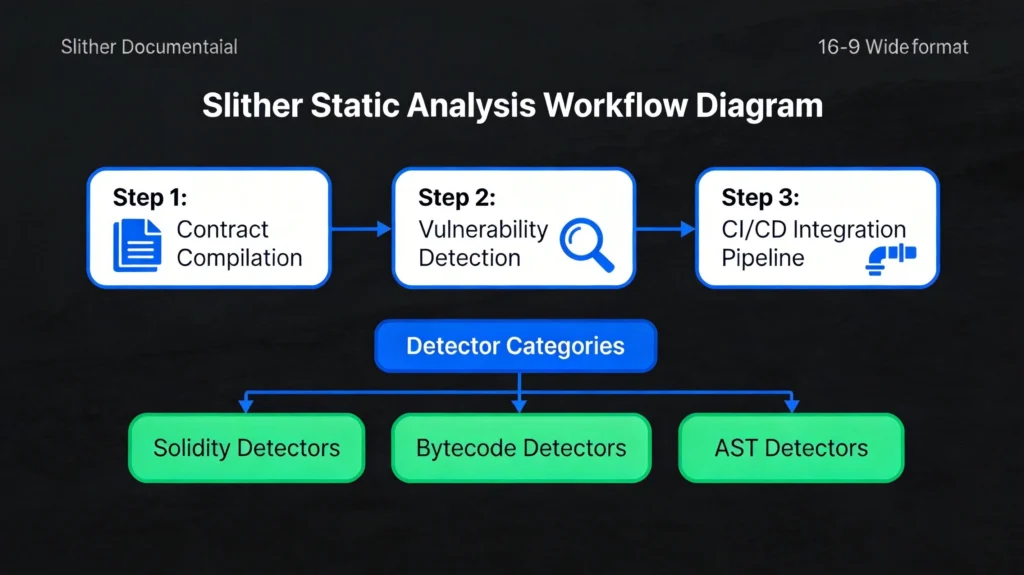
Slither的核心特点:
- 速度快:基于源码或字节码的快速分析
- 准确率高:由安全专家设计的检测规则
- 可扩展:支持自定义检测器开发
- CI友好:易于集成到自动化流程
1.2 Slither能检测的问题类型
Slither预置了丰富的检测器,涵盖以下问题类型:
| 类别 | 典型问题 | 风险等级 |
|---|---|---|
| 访问控制 | 缺失权限检查、tx.origin滥用 | 高 |
| 数学运算 | 整数溢出/下溢、舍入错误 | 高 |
| 拒绝服务 | 可中断的外部调用、循环消耗过多gas | 高 |
| 治理问题 | 投票操纵、时间锁缺失 | 中-高 |
| 效率问题 | 未使用的变量、SSTORE重复写入 | 低 |
| 代码质量 | 冗余代码、代码复杂度高 | 低 |
二、安装与配置
2.1 环境要求
Slither需要以下环境:
- Python 3.8+
- solc编译器(支持多个版本)
- pip包管理器
2.2 安装步骤
bash
# 推荐使用虚拟环境
python3 -m venv slither-env
source slither-env/bin/activate

# 安装Slither
pip install slither-analyzer

# 安装solc-select管理编译器版本
pip install solc-select

# 安装常用Solidity版本
solc-select install 0.8.20
solc-select install 0.8.19
solc-select install 0.8.7

# 验证安装
slither --version
2.3 Docker使用
bash
# 使用Docker运行Slither
docker pull trailofbits/eth-security-toolbox

# 运行容器
docker run -it \
  -v $(pwd):/workspace \
  trailofbits/eth-security-toolbox

# 在容器内运行Slither
slither /workspace/contracts/MyContract.sol
三、基础使用
3.1 快速扫描
bash
# 扫描单个文件
slither contracts/MyToken.sol

# 扫描多个文件
slither contracts/

# 生成JSON报告
slither contracts/ --json report.json

# 生成Markdown报告
slither contracts/ --markdown-report report.md

# 只显示高危问题
slither contracts/ --exclude-low --exclude-medium
3.2 输出格式解析
Slither支持多种输出格式,以下是控制台输出的示例:
plaintext
contracts/MyContract.sol#MyToken (MyToken)
    Critical findings:
    NCSSSR: Centralization risk for owner operation
        Reference: https://github.com/crytic/slither/wiki/Detector-Documentation#centralization-risk-for-owner-operation
        Found in: [MyToken.deposit]
        Code: msg.sender == owner()

    HIGH - Integer overflow:
        Integer overflow in MyToken.add(uint256,uint256)
        Reference: https://github.com/crytic/slither/wiki/Detector-Documentation#integer-overflow
        Found in: [MyToken.add]
        Code: x + y
3.3 常用命令行选项
bash
# 指定solc版本
slither contracts/ --solc-remaps "@openzeppelin=node_modules/@openzeppelin"

# 添加额外的solc路径
slither contracts/ --solc-args "--base-path /path/to/lib"

# 过滤特定检测器
slither contracts/ --detect reentrancy-eth,unchecked-lowlevel

# 跳过特定检测器
slither contracts/ --exclude reentrancy-no-eth,unused-state

# 深度分析模式(更慢但更准确)
slither contracts/ --detectors-verbose --filter-paths "test"

# 生成漏洞统计
slither contracts/ --show-uncoveted
四、核心功能详解
4.1 打印函数调用图
bash
# 生成函数调用图
slither-graph contracts/MyContract.sol

# 生成dot格式文件(可用Graphviz渲染)
slither contracts/MyContract.sol --print call-graph

# 生成CFG(控制流图)
slither contracts/MyContract.sol --print cfg
这个功能对于理解合约逻辑和数据流非常有帮助,特别是在审计复杂合约时。
4.2 数据依赖分析
bash
# 分析变量依赖关系
slither contracts/MyContract.sol --print data-dependencies

# 显示函数权限
slither contracts/MyContract.sol --print function-id

# 显示权限解析结果
slither contracts/MyContract.sol --print authorization
4.3 继承分析
bash
# 显示继承树
slither contracts/MyContract.sol --print inheritance

# 显示完整的合约继承关系
slither contracts/MyContract.sol --print inheritance-graph

# 显示修饰符使用情况
slither contracts/MyContract.sol --print modifiers
五、代码示例:常见漏洞检测
5.1 示例合约(含漏洞)
以下是一个包含多种安全问题的示例合约:
solidity
// SPDX-License-Identifier: MIT
pragma solidity ^0.8.20;

contract VulnerableToken {
    mapping(address => uint256) public balances;
    uint256 public totalSupply;
    address public owner;

    event Transfer(address indexed from, address indexed to, uint256 value);

    constructor() {
        owner = msg.sender;
    }

    // 漏洞1:缺少溢出检查
    function add(uint256 a, uint256 b) public pure returns (uint256) {
        return a + b; // 整数溢出风险
    }

    // 漏洞2:重入攻击风险
    function withdraw() public {
        uint256 balance = balances[msg.sender];
        require(balance > 0);

        (bool success, ) = msg.sender.call{value: balance}("");
        require(success, "Transfer failed");

        balances[msg.sender] = 0;
    }

    // 漏洞3:tx.origin滥用
    function transferTo(address recipient, uint256 amount) public {
        require(tx.origin == owner, "Not owner");
        payable(recipient).transfer(amount);
    }

    // 漏洞4:未检查的返回值
    function callExternal(address target, bytes memory data) public {
        target.call(data); // 未检查返回值
    }

    // 漏洞5:硬编码的余额检查
    function doubleWithdraw() public {
        uint256 balance = balances[msg.sender];
        if (balance > 0) {
            balances[msg.sender] = 0;
            payable(msg.sender).transfer(balance * 2); // 双重提取
        }
    }

    function mint(address to, uint256 amount) public {
        require(msg.sender == owner);
        balances[to] += amount; // 溢出
        totalSupply += amount;
    }
}
5.2 运行Slither检测
bash
slither contracts/VulnerableToken.sol --detect all --json vulnerable_report.json
检测结果会显示:
- Integer overflow –
add函数缺少SafeMath - Reentrancy –
withdraw函数存在重入风险 - tx-origin –
transferTo使用tx.origin - unchecked-return-value –
callExternal未检查返回值 - reentrancy-no-eth –
doubleWithdraw重入漏洞
六、自定义检测器开发
6.1 Slither检测器基础
Slither的检测器基于抽象语法树(AST)和中间表示(IR)工作。以下是创建一个自定义检测器的基本结构:
python
from slither.detectors.abstract_detector import AbstractDetector, DetectorClassification
from slither.slithir.operations import Operation, SolidityCall

class MyCustomDetector(AbstractDetector):
    """
    自定义检测器示例
    """

    ARGUMENT = 'my-custom-detector'  # 命令行参数
    HELP = '描述检测器功能'           # 帮助文本
    IMPACT = DetectorClassification.HIGH  # 影响等级
    CONFIDENCE = DetectorClassification.HIGH  # 置信度

    WIKI = 'https://github.com/crytic/slither/wiki/Adding-a-new-detector'

    def _detect(self) -> list:
        """
        主检测逻辑
        """
        results = []

        for contract in self.compilation_unit.contracts:
            # 检测逻辑
            findings = self._analyze_contract(contract)

            if findings:
                results.append(self._create_result(contract, findings))

        return results

    def _analyze_contract(self, contract):
        """分析单个合约"""
        findings = []

        for function in contract.functions:
            # 检查特定模式
            if self._is_vulnerable(function):
                findings.append({
                    'function': function,
                    'vulnerability': '具体漏洞描述'
                })

        return findings

    def _is_vulnerable(self, function) -> bool:
        """判断函数是否包含漏洞"""
        # 实现具体检测逻辑
        return False

    def _create_result(self, contract, findings):
        """生成检测结果"""
        info = ['自定义漏洞描述:\n']

        for finding in findings:
            info.append(f'  - {finding["function"].name}: {finding["vulnerability"]}\n')

        return self.generate_result(info)
6.2 实用检测器示例
以下是几个常见自定义检测器的实现:
python
from slither.detectors.abstract_detector import AbstractDetector, DetectorClassification
from slither.slithir.operations import Binary, BinaryType
from slither.core.expressions import Identifier

class UncheckedReturnValueDetector(AbstractDetector):
    """
    检测未检查的外部调用返回值
    """

    ARGUMENT = 'unchecked-external'
    HELP = '检测未检查的外部调用返回值'
    IMPACT = DetectorClassification.HIGH
    CONFIDENCE = DetectorClassification.MEDIUM

    def _detect(self) -> list:
        results = []

        for contract in self.compilation_unit.contracts:
            for function in contract.functions:
                findings = self._check_function(function)

                if findings:
                    results.append(self._create_result(function, findings))

        return results

    def _check_function(self, function):
        """检查函数中的外部调用"""
        findings = []

        for node in function.nodes:
            for ir in node.irs:
                # 检查是否存在外部调用
                if self._is_external_call(ir):
                    # 检查是否检查了返回值
                    if not self._checks_return_value(ir, function):
                        findings.append({
                            'node': node,
                            'call': ir
                        })

        return findings

    def _is_external_call(self, ir) -> bool:
        """判断是否为外部调用"""
        return hasattr(ir, 'destination') and ir.destination != ir.contract

    def _checks_return_value(self, call_ir, function) -> bool:
        """检查是否检查了返回值"""
        # 分析后续节点是否使用了call的结果
        return False  # 简化实现

    def _create_result(self, function, findings):
        """生成检测结果"""
        info = [
            f'Unchecked return value in function {function.name}:\n',
            f'  External call at {findings[0]["node"]}\n'
        ]

        return self.generate_result(info)
6.3 整数溢出检测器
python
class IntegerOverflowDetector(AbstractDetector):
    """
    检测整数溢出漏洞
    """

    ARGUMENT = 'integer-overflow-custom'
    HELP = '检测可能的整数溢出'
    IMPACT = DetectorClassification.HIGH
    CONFIDENCE = DetectorClassification.MEDIUM

    def _detect(self) -> list:
        results = []

        for contract in self.compilation_unit.contracts:
            for function in contract.functions:
                for node in function.nodes:
                    for ir in node.irs:
                        if isinstance(ir, Binary):
                            if self._is_addition_or_multiplication(ir.type):
                                if not self._has_safemath(ir, node, function):
                                    results.append(self._create_result(ir, node, function))

        return results

    def _is_addition_or_multiplication(self, binary_type):
        """判断是否为加法或乘法"""
        return binary_type in [
            BinaryType.ADDITION,
            BinaryType.MULTIPLICATION
        ]

    def _has_safemath(self, ir, node, function) -> bool:
        """检查是否使用了SafeMath"""
        for prev_node in node.immediate_predecessors:
            for prev_ir in prev_node.irs:
                if isinstance(prev_ir, SolidityCall):
                    if 'safe' in str(prev_ir).lower():
                        return True
        return False

    def _create_result(self, ir, node, function):
        """生成检测结果"""
        return self.generate_result([
            f'Potential integer overflow in {function.name}:\n',
            f'  Operation: {ir}\n',
            f'  Node: {node}\n'
        ])
6.4 部署自定义检测器
bash
# 保存检测器到指定目录
mkdir -p ~/.slither/detectors

# 复制检测器
cp my_detector.py ~/.slither/detectors/

# 运行自定义检测器
slither contracts/ --detect my-custom-detector

# 或者通过Python API使用
from my_detector import MyCustomDetector

from slither import Slither

slither = Slither('contracts/MyContract.sol')
detector = MyCustomDetector(slither)
results = detector.detect()
七、CI/CD集成
7.1 GitHub Actions集成
yaml
# .github/workflows/security-analysis.yml
name: Smart Contract Security Analysis

on:
  push:
    branches: [main, develop]
    paths:
      - 'contracts/**/*.sol'
  pull_request:
    branches: [main]
    paths:
      - 'contracts/**/*.sol'

jobs:
  slither:
    runs-on: ubuntu-latest
    steps:
      - uses: actions/checkout@v4

      - name: Set up Python
        uses: actions/setup-python@v5
        with:
          python-version: '3.10'

      - name: Install Slither
        run: |
          pip install slither-analyzer

      - name: Install solc-select
        run: |
          pip install solc-select
          solc-select install 0.8.20
          solc-select use 0.8.20

      - name: Install dependencies
        run: |
          npm install
          pip install -r requirements-dev.txt

      - name: Run Slither Analysis
        run: |
          slither contracts/ \
            --json slither-results.json \
            --markdown-report slither-report.md

      - name: Upload results
        uses: actions/upload-artifact@v4
        with:
          name: slither-results
          path: |
            slither-results.json
            slither-report.md
          retention-days: 30

      - name: Check for critical findings
        run: |
          if grep -q '"impact": "HIGH"' slither-results.json || \
             grep -q '"impact": "CRITICAL"' slither-results.json; then
            echo "Critical security issues found!"
            echo "Please review the Slither report before merging."
            exit 1
          fi
7.2 GitLab CI集成
yaml
# .gitlab-ci.yml
stages:
  - test
  - security

slither:
  stage: security
  image: python:3.10-slim

  before_script:
    - pip install slither-analyzer solc-select
    - solc-select install 0.8.20
    - solc-select use 0.8.20

  script:
    - slither contracts/ --json slither-report.json

  artifacts:
    reports:
      json: slither-report.json
    expire_in: 1 week

  rules:
    - if: '$CI_PIPELINE_SOURCE == "merge_request_event"'
    - if: '$CI_COMMIT_BRANCH == "main"'
7.3 pre-commit hook集成
yaml
# .pre-commit-config.yaml
repos:
  - repo: local
    hooks:
      - id: slither
        name: Slither Security Scan
        entry: slither contracts/ --json
        language: system
        files: '\.sol$'
        pass_filenames: false
        always_run: true
八、集成到Hardhat项目
javascript
// hardhat.config.js
import '@nomicfoundation/hardhat-toolbox';
import { execSync } from 'child_process';

task('slither', 'Run Slither static analysis')
  .setAction(async () => {
    console.log('Running Slither analysis...');

    try {
      execSync('npx slither .', { stdio: 'inherit' });
      console.log('Slither analysis completed successfully');
    } catch (error) {
      console.error('Slither found issues:', error.message);
      process.exit(1);
    }
  });

// 或者创建自定义插件
function slitherPlugin(hre) {
  hre.run('slither');
}

module.exports = {
  // ... other config
};
九、检测结果处理
9.1 结果解析脚本
python
import json
from pathlib import Path

class SlitherReportParser:
    """解析Slither JSON报告"""

    def __init__(self, report_path: str):
        self.report_path = Path(report_path)
        self.data = None

    def load(self):
        with open(self.report_path, 'r') as f:
            self.data = json.load(f)

    def get_findings_by_severity(self):
        """按严重程度分组"""
        findings = {
            'critical': [],
            'high': [],
            'medium': [],
            'low': [],
            'informational': []
        }

        for item in self.data.get('results', {}).get('detectors', []):
            impact = item.get('impact', '').lower()
            if 'critical' in impact:
                findings['critical'].append(item)
            elif 'high' in impact:
                findings['high'].append(item)
            elif 'medium' in impact:
                findings['medium'].append(item)
            elif 'low' in impact:
                findings['low'].append(item)
            else:
                findings['informational'].append(item)

        return findings

    def get_summary(self):
        """获取摘要统计"""
        findings = self.get_findings_by_severity()
        return {
            'total': sum(len(v) for v in findings.values()),
            'critical': len(findings['critical']),
            'high': len(findings['high']),
            'medium': len(findings['medium']),
            'low': len(findings['low']),
        }

    def has_blocking_issues(self):
        """检查是否有阻塞性问题"""
        summary = self.get_summary()
        return summary['critical'] > 0 or summary['high'] > 0

    def generate_report(self, output_path: str):
        """生成报告"""
        summary = self.get_summary()
        findings = self.get_findings_by_severity()

        report = f"""# Slither Security Report

## Summary
- Total findings: {summary['total']}
- Critical: {summary['critical']}
- High: {summary['high']}
- Medium: {summary['medium']}
- Low: {summary['low']}

## Critical Issues
"""

        for finding in findings['critical']:
            report += f"\n### {finding['check']}\n"
            report += f"- **File**: {finding['filename']}\n"
            report += f"- **Function**: {finding.get('function', 'N/A')}\n"
            report += f"- **Description**: {finding['description']}\n"

        with open(output_path, 'w') as f:
            f.write(report)
十、总结
Slither是智能合约安全开发中不可或缺的工具。本文全面介绍了:
- 基础使用:Slither的安装配置和基本命令
- 核心功能:调用图、数据依赖、继承分析等
- 实战案例:通过示例合约演示漏洞检测
- 自定义检测器:开发满足特定需求的检测器
- CI/CD集成:与企业工作流程的集成方案
- 结果处理:报告解析和自动化处理
建议将Slither作为开发流程的常规环节:
- 本地开发时运行快速扫描
- PR时运行完整分析
- 合并前必须修复高危问题
- 定期更新Slither版本获取最新检测规则
配合其他工具(如Echidna、Mythril)使用,可以构建更全面的安全检测体系。
发表回复